
iAuthFlow v2 phishing toolkit uses a phished Google session to enroll an attacker-controlled passkey that survives password resets.
Abnormal Security researchers have published an analysis of iAuthFlow v2, a phishing toolkit sold on a Russian-language cybercrime forum for $10,000 base price. The author also offers for sale additional capability modules separately. The headline feature is not the phishing itself. It’s what happens after the phishing succeeds.
“Once the target completes a phishable Google login, the toolkit uses the authenticated session to enroll a passkey controlled by the operator.” reads the report published by Abnormal Security. “In the seller’s recorded demonstration, the account owner later changes their password, invalidating the active session—but the operator authenticates with the newly enrolled passkey and returns to the mailbox.”
That’s the architecture. The phishing flow gives the attacker a temporary window. iAuthFlow v2 uses that window to create a permanent key that doesn’t close when the window does.
The toolkit uses a browser-in-the-middle attack. The victim sees what looks like a real Google login page, while iAuthFlow v2 runs another browser on the attacker’s server. Everything the victim types, including their email, password and two-factor code, is sent to that remote browser, which logs in to Google. The victim provides the credentials, while the attacker gets the authenticated session. In the demo, the fake login page used a trycloudflare.com subdomain, giving the link a valid TLS certificate and a more trustworthy appearance.
Once the relay gives the attacker’s browser Google’s session cookies, iAuthFlow v2 holds the target on a “Verification, Processing” page while the toolkit works inside the account.
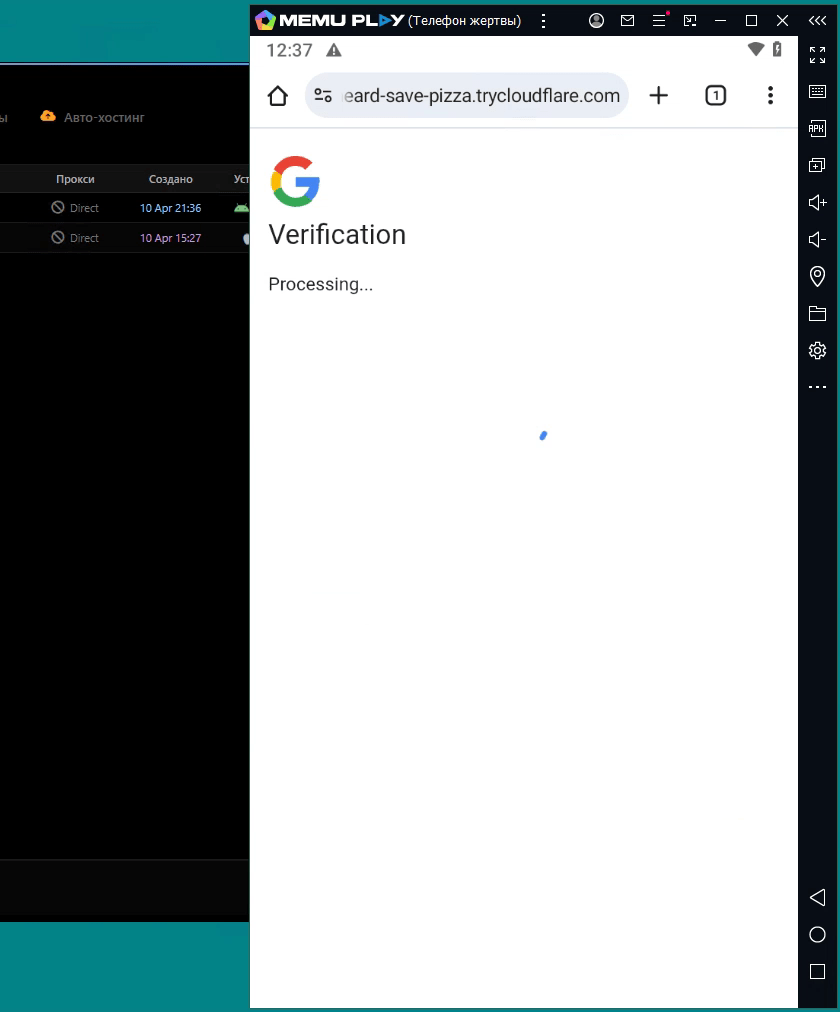
This pause is a named state in the software, not a recording artifact. The session log timestamps tell the story precisely: login at 21:37:18, passkey created and saved at 21:37:24. Six seconds to establish persistent access.
The passkey module navigates the target’s Google passkey settings through the authenticated browser and requests a new credential. Google may ask for identity re-verification before allowing the enrollment; the demo shows the toolkit handling this. The enrolled passkey is then stored on the attacker’s side, and the toolkit records “Passkey created and saved.”
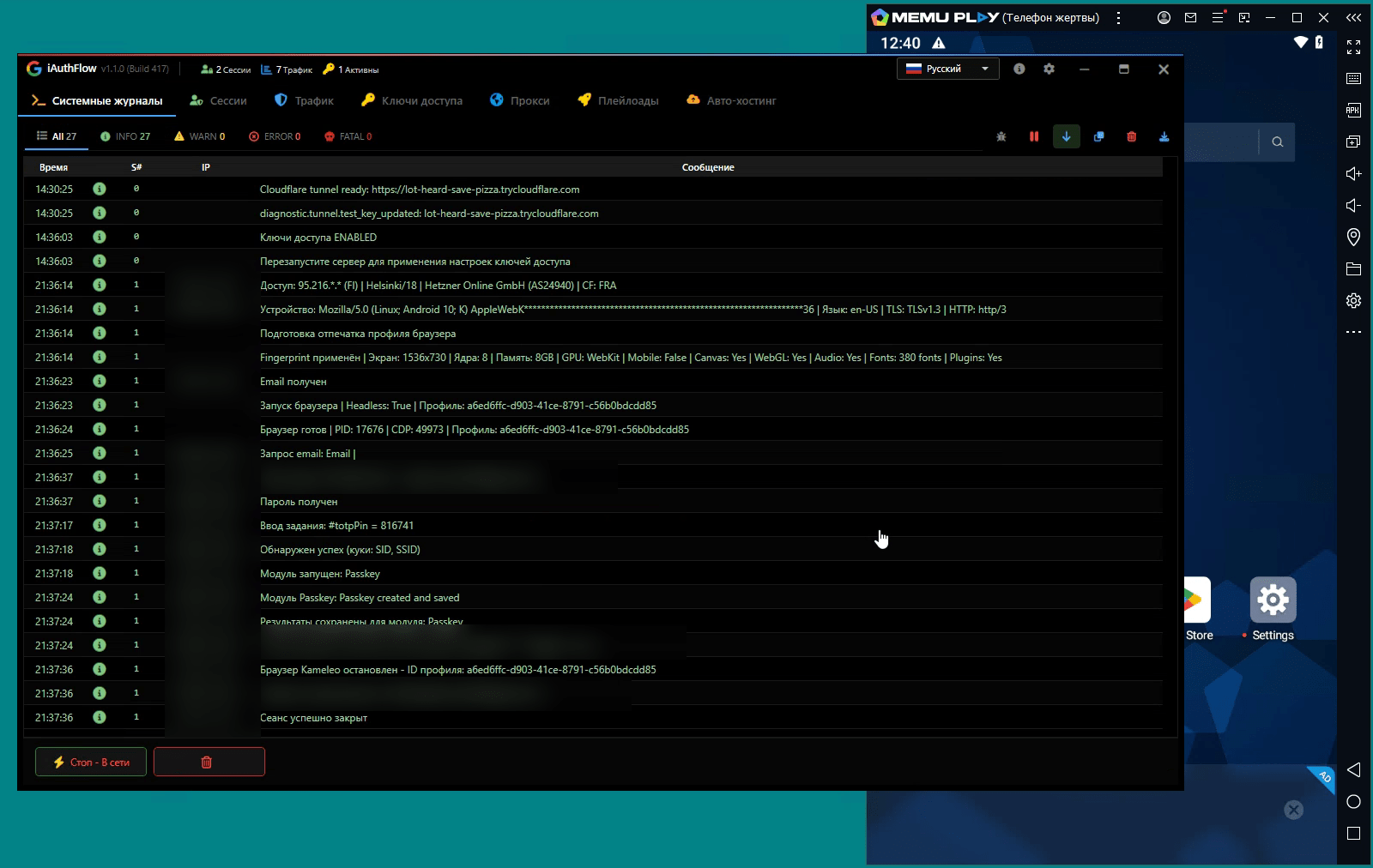
“The log records “Passkey created and saved.” At this point, the operator no longer has only the authenticated session created through the phishing flow.” continues the report. “The newly enrolled passkey is a separate authentication credential registered to the target’s Google account. The subsequent demonstration shows Google offering that passkey during a later sign-in, consistent with the operator retaining the credential needed to use it.”
This is more serious than simply stealing a session cookie because a password reset does not remove a passkey. Changing a Google password ends active sessions, revokes app passwords and invalidates some OAuth tokens. A passkey is different: it is a separate cryptographic credential linked to the account and remains active until it is manually removed.
The demo shows the risk clearly. After the victim changes their password, the attacker’s session stops working. But the attacker can choose “Try another way,” use the passkey they previously added and regain access to the mailbox. The victim may have no idea this happened.
Abnormal notes a technically plausible mechanism for how iAuthFlow v2 stores and uses the passkey: Chromium’s software-based virtual authenticators, which support WebAuthn registration and retain private keys without requiring the target’s physical device. The researchers don’t confirm this is what the toolkit uses, since the demonstration doesn’t reveal the implementation. What they confirm is that the behavior shown is consistent with how passkeys work, and there’s an available path to produce it.
The toolkit targets Google in the build Abnormal examined, but the seller advertises versions for Microsoft, iCloud, and LinkedIn. The same post-authentication persistence logic applies wherever passkeys can be enrolled.
Containment after an iAuthFlow v2 compromise needs to go further than incident response teams are often used to going.
“That cleanup is particularly important with iAuthFlow v2 because neither a password reset nor session revocation removes an attacker-enrolled passkey.” states the report. “Restore the account only after unauthorized authentication methods and other persistence mechanisms have been removed.”
The full sweep should cover unauthorized passkeys and security keys, malicious Gmail filters and forwarding rules, delegated access, OAuth grants and app permissions, and recovery settings. Organizations running Google Workspace can use the Security Investigation Tool to audit the account before declaring it clean.
The best way to prevent these attacks is to rely on authentication methods that cannot be easily stolen through phishing. WebAuthn-based authentication is tied to the real website, so stolen passwords or codes cannot be used through a relay attack. Google Workspace can enforce this with the “Only security key” option for 2-Step Verification and through the Advanced Protection Program. These settings also disable app passwords, which the toolkit may target on less protected accounts.
The toolkit’s price and professional sales channels suggest this is an ongoing business, not a one-time release. If a Google account is compromised but appears clean after a password reset, security teams should also check the account’s passkeys and security keys before closing the case.
“iAuthFlow v2 illustrates how phishing has evolved beyond stealing credentials or even hijacking a single authenticated session. Once an attacker gains legitimate access to an account, that access can become a starting point for establishing new authentication methods, modifying account settings, and creating other forms of persistence.” concludes the report. “Response and recovery cannot end with a password reset or session revocation. Organizations must also examine what changed after authentication—especially newly enrolled credentials, recovery methods, OAuth grants, and mailbox settings—and remove anything the attacker left behind. “
Follow me on Twitter: @securityaffairs and Facebook and Mastodon
(SecurityAffairs – hacking, iAuthFlow v2 phishing toolkit)
